Installation and downloads
Ready-to-install packages
Download a released build from the muSRFlow Releases page. Each release groups the supported application packages and their checksums in one place. The repository’s Packages page also retains published versions and runtime bundles.
- Windows x64
Download
muSRFlow-<version>-x64.exe. The scientific runtime is included and runs through WSL2. Continue with Windows installation.- Linux x86_64
Download
musrflow-<version>-x86_64.rpmormuSRFlow-<version>-x86_64.AppImage. Add amusrflow-runtimepackage only when ROOT/musrfit is not already available. Continue with Linux installation.- Web browser
Nothing to install; the server manages the scientific tools. Open muSRFlow.
Verify a downloaded installer against its accompanying .sha256 file when
one is provided. Desktop packages do not require Node.js or npm.
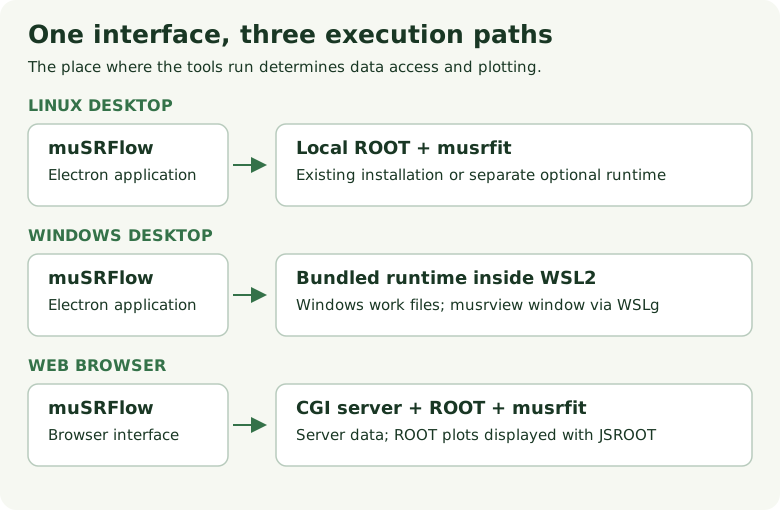
Where each edition runs ROOT and musrfit. The user interface and MSR workflow remain the same.
Which edition should I use?
Use the web edition for the quickest start when its server already has access to your run data. Nothing is installed locally and generated files are available through the Results tab.
Use the desktop edition when you need local data, native file dialogs, an expert MSR editing workflow, or independent control of the ROOT/musrfit installation. Windows includes a self-contained WSL2 runtime. Linux keeps the application and runtime separate so it can use an existing scientific stack.
After installation
Continue with Getting started for the first Plot and Fit. The detailed differences between desktop and browser operation are in Web and desktop editions.